Stop Searching. Start Auditing. A Cloud Approach to Public Index Reconnaissance

Most OSINT investigations start with a browser tab. You type in a domain. You add site: and filetype:pdf. You hit enter. Then you do it again for Bing. Then for DuckDuckGo. You are manually copying links into a spreadsheet while fighting against Google’s personalized results and its aggressive CAPTCHA walls.
It is slow. It is biased. And frankly, it is boring.
We often forget that search engines are not neutral windows into the web. They are curated galleries. When you search from your personal laptop, Google knows who you are, where you are, and what you clicked on yesterday. Your results are tailored to keep you engaged, not to give you an objective map of a target’s public footprint.
If you want to know what the world sees, you need to stop looking through your own eyes. You need a clean slate.
The Case for the Cloud Sandbox
This is why I stopped running quick reconnaissance scripts on my local machine. Local environments are messy. They are filled with cached cookies, conflicting Python libraries, and IP addresses that scream "residential user."
Instead, I use Google Cloud Console (or AWS CloudShell/Azure Cloud Shell). Think of it as a sterile lab.
Why does this matter?
- Isolation and Security: You are often testing code found online or writing experimental scripts. Running them in a cloud environment isolates your main workstation. If a script has a dependency issue, or worse, if you accidentally execute something malicious while parsing results, your personal data remains safe. The cloud instance is ephemeral. When you close the tab, the environment resets.
- Neutral Network Footprint: Requests originate from data center IPs. This reduces the "personalization bubble" effect. You get results that are closer to what a generic server-side bot would see, rather than what your personalized Google account shows you.
- A Future-Proof Habit: This isn't just about this specific script. Building the habit of testing unknown tools in a sandboxed cloud environment is a critical security practice for any serious analyst. Whether you are testing a new GitHub repo for OSINT or a beta version of a scraping tool, the cloud console is your safest bet. It keeps your local machine clean and your operational security tight.

Why Not Just Crawl the Site?
You might be thinking, "Mario, why not just use Screaming Frog or Scrapy to crawl the entire domain?"
Great question. If your goal is to find every single file hidden in the deepest corners of a server, a crawler is the right tool. But crawling is active. It knocks on every door. It triggers WAFs. It gets blocked by Cloudflare. It is loud.
Querying search indexes is passive. It answers a different question: "What has this organization accidentally made visible to the general public?"
If a sensitive financial report shows up in a Google search, it is already leaked. It is already indexed. It is already in the hands of anyone who knows how to use a dork. A crawler might find ten thousand files that no one else knows exist. But SerpApi tells you which ones are actually dangerous because they are already public.
There is a huge difference between "hidden on the server" and "invisible to Google." We care about the latter.
The Engine: Why SerpApi?
To make this script work without getting blocked by CAPTCHAs or dealing with complex HTML parsing, I rely on SerpApi.
SerpApi is a robust solution that handles the heavy lifting of interacting with search engines. It normalizes the data into clean JSON, making it easy to process programmatically. For OSINT practitioners, it’s a game-changer because it allows you to scale your queries without building your own proxy infrastructure.
Best of all, they offer a generous free tier. It’s more than enough for casual researchers, students, or analysts who need to run occasional checks without committing to a monthly subscription. It lowers the barrier to entry for automated OSINT, allowing you to focus on analysis rather than infrastructure maintenance.
The Multi-Engine Reality
Here is the thing about relying on just one search engine. Google is powerful, but it is not omniscient. Bing has a different crawler. It indexes different parts of the web. DuckDuckGo pulls from various sources and offers a view of what is visible without heavy profiling.
I have seen cases where a critical document was de-indexed by Google after a takedown request but was still sitting proudly on Bing’s first page. If you only check Google, you miss it. If you only check Bing, you miss the context.
You need to cross-reference. You need to see the discrepancies. That is where the real intelligence lies.
The Script: Simple, Clean, Effective
I wrote a small Python script to automate this. It is not a massive framework. It is not trying to replace commercial OSINT platforms. It is a lightweight piece of code designed to do one thing well: query multiple engines for specific file types on a specific domain, and separate the results so you can compare them.
Here is how it works.
- It asks for a domain. (e.g.,
target.com) - It asks for a file extension. (e.g.,
pdf,xlsx,docx) - It queries Google, Bing, and DuckDuckGo simultaneously.
- It separates the results. It does not merge them into one big list. It shows you what Google found, then what Bing found, then what DuckDuckGo found.
Why separate them? Because if a link appears on all three, it is highly visible. If it appears only on Bing, it might be an orphan page that Google’s algorithm ignored. That distinction matters.
The Code
You can find the full script on this GitHub Gist.
It is designed to run in any Python environment, but I recommend using it in Google Cloud Console. Set your API key as an environment variable (SERPAPI_API_KEY). Run the script. Paste the domain. Watch the results roll in.
import requests
import os

# 1. Get API Key from Environment Variable
API_KEY = os.environ.get("SERPAPI_API_KEY")
if not API_KEY:
    print("Error: SERPAPI_API_KEY environment variable is not set.")
    exit(1)

# 2. Prompt for domain and file extension
domain = input("Enter the domain to analyze (e.g., example.com): ").strip()

# Prompt for extension and clean it up (remove leading dot if the user types ".pdf" instead of "pdf")
raw_extension = input("Enter the file extension (e.g., pdf, docx, xlsx): ").strip()
extension = raw_extension.lstrip('.').lower()

if not domain or not extension:
    print("Error: Domain and extension cannot be empty.")
    exit(1)

QUERY = f"site:{domain} filetype:{extension}"

# Search engines to query
ENGINES = ["google", "bing", "duckduckgo"]

# 3. Dictionary to divide results by engine
separated_results = {}

for engine in ENGINES:
    print(f"\n[Searching on {engine}...]")

    params = {
        "engine": engine,
        "q": QUERY,
        "api_key": API_KEY
    }

    try:
        response = requests.get("https://serpapi.com/search", params=params)
        response.raise_for_status() # Check for HTTP errors
        data = response.json()

        # Initialize an empty list for this specific engine
        separated_results[engine] = []

        # Extract links from organic results
        for result in data.get("organic_results", []):
            link = result.get("link", "")

            # Check if the link exists and contains the extension
            if link and f".{extension}" in link.lower():
                # Prevent duplicates within the same engine
                if link not in separated_results[engine]:
                    separated_results[engine].append(link)

    except Exception as e:
        print(f"Error querying {engine}: {e}")
        separated_results[engine] = [] # Ensure key exists even if it fails

# 4. Print the divided results
print("\n" + "="*50)
print(f"RESULTS FOR DOMAIN: {domain} (filetype: {extension})")
print("="*50)

for engine, file_list in separated_results.items():
    print(f"\n--- Found {len(file_list)} files on {engine.upper()} ---")
    if file_list:
        for file_url in file_list:
            print(f"  - {file_url}")
    else:
        print("  (No files found on this engine)")
Real World Example
Let’s look at what happens when we run this against a major domain like tesla.com looking for PDFs.
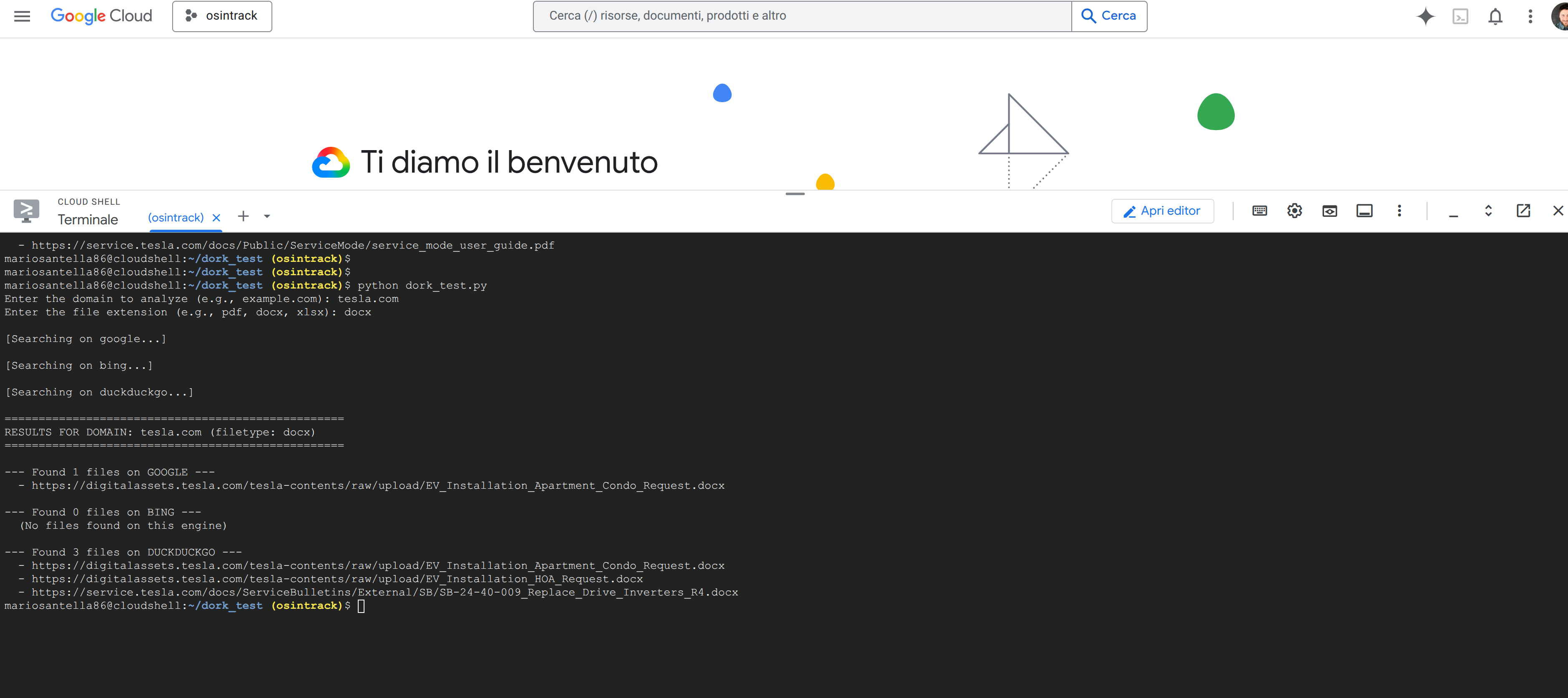
Notice how the results differ. Google might prioritize recent investor relations documents. Bing might surface older technical manuals or regulatory filings that haven't been updated in its index recently. Seeing both side-by-side gives you a fuller picture of the document landscape.
A Note on Limitations
Let’s be clear about what this is not.
This script does not paginate through thousands of results. Search engines limit deep access for a reason. This script grabs the top results, the most relevant ones, the ones the algorithm thinks matter most. If you need to dig deeper, you will need to implement pagination or switch to a dedicated crawler.
This script does not download the files. It lists them. Downloading hundreds of PDFs from unknown sources is a security risk. Inspect the links first. Verify the domains. Then decide what to pull.
This script does not replace Wayback Machine. For historical data, you need to look at archives. This tool is for the current, live public index.
Why This Matters
In OSINT, we often get caught up in complex tools and expensive subscriptions. We forget that sometimes the best insight comes from simply asking the right question to the right audience.
By automating these basic queries across multiple engines, you remove the bias. You save time. And you get a clearer picture of what is actually out there.
It is not about having the biggest hammer. It is about knowing exactly where to tap.
Try it out. Let me know if you find anything interesting in the gaps between Google and Bing.